The Commercial Moving CRM
that keeps every dollar of the job.
From first quote to paid invoice in one place. Change orders get signed on site and land on the invoice, so no extra work goes unbilled.
14-day free trial · No credit card · Cancel anytime
Running 50+ crews or multiple branches? Book an enterprise demo
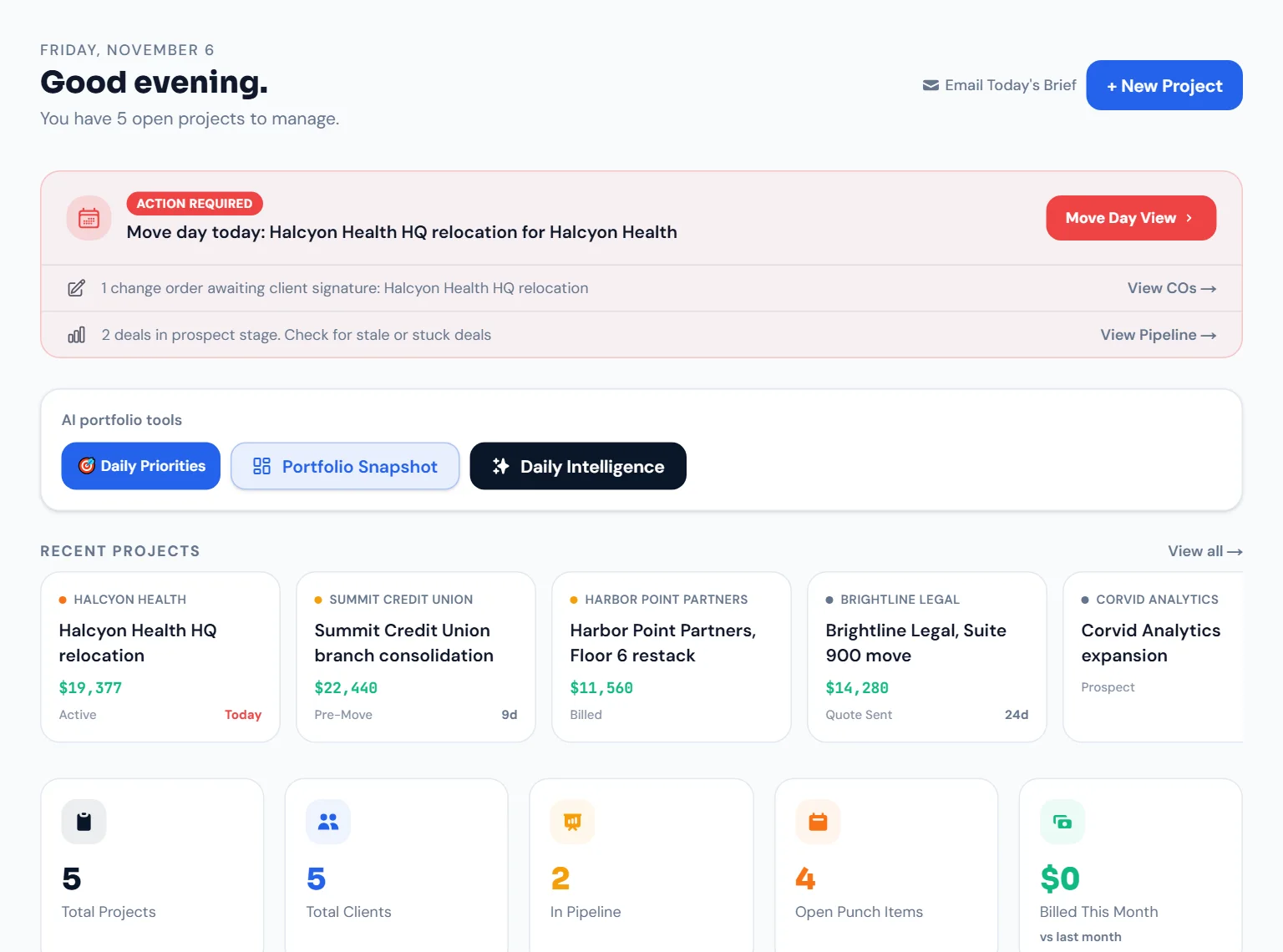
Sample dataReal MoveKore screen. The company and jobs are sample data.
Built for the commercial moves you run
Your current stack is costing you money
Most commercial movers run multi-phase corporate relocations on tools designed for residential moves, or on no tools at all.
Extra work happens on move day, the paperwork never catches up, and the charge never makes it onto the invoice.
Photos live in one app, approvals in email, billing in QuickBooks. Someone has to reconcile it all after every job.
When a client questions a charge, you end up digging through texts to prove what they agreed to.
Sound familiar? You're probably managing this with…
What is MoveKore?
MoveKore is a commercial moving CRM built for companies managing multi-phase corporate relocations. It replaces spreadsheets, email chains, and disconnected photo tools with a single platform covering quotes, phase scheduling, change orders, client portals, and QuickBooks billing, from the first site visit to the final paid invoice.
Made for office and corporate moves, not your cousin's apartment. Every feature is designed around the reality of a multi-crew, multi-phase corporate relocation.
Win the job. Run the move. Get paid on time.
Winning the job, running the move and getting paid usually live in separate tools. In MoveKore they are steps on the same project, with an audit trail at every stage.
Win the job
Use rate-card presets to build an accurate quote in minutes. Email it to the client, who reviews and accepts it online, with every version kept on the job.
Run the move
Crew opens MoveKore on their phone, adds photos and daily logs, and submits timecards. PMs get change orders signed on site and track every phase and punch item from the web dashboard.
Get paid, stay clean
Close out the job and share the completion certificate through the client's portal. Push the final invoice (base plus every approved CO) to QuickBooks in one click. The audit trail stays with the project.

Build the quote on the site walkthrough and send it before you leave the building.
Your whole job, right in their hands.
Crews pull up the move on a tablet and clients sign change orders on the spot. Photos and approvals sync back to the office while the job is still running, so nothing is left on paper in the truck.
- Clients review and sign change orders in person or from their phone
- Crews add room-tagged photos from the phone they already carry
- Every update flows straight to billing and the audit log

From First Call to Final Invoice.
Every Step, Managed.
Fourteen stages on one project record, from the first call to the paid invoice.
Prospect
- Capture lead info and move requirements
- Assign project manager
- Set move date for countdown timer
One dashboard.
Every project.
Every dollar.
Leadership sees every active job and every outstanding balance on one live dashboard, with health risks flagged before they turn into expensive problems.
- 💰Outstanding balances across all active projects, updated in real time
- 🏥Project health scores that flag compliance gaps and overdue items before they escalate (Professional and up)
- 📍14-stage pipeline board: see every job by stage at a glance
- ⚠️Action items surfaced daily, such as overdue punch items, unsigned COs and expiring certs
- 📄Full audit log for every project event, exportable to PDF on Business and up
Every stakeholder. One system.
PMs get full control. Crews work from their phones. Clients and subs get a clean portal with no login required.
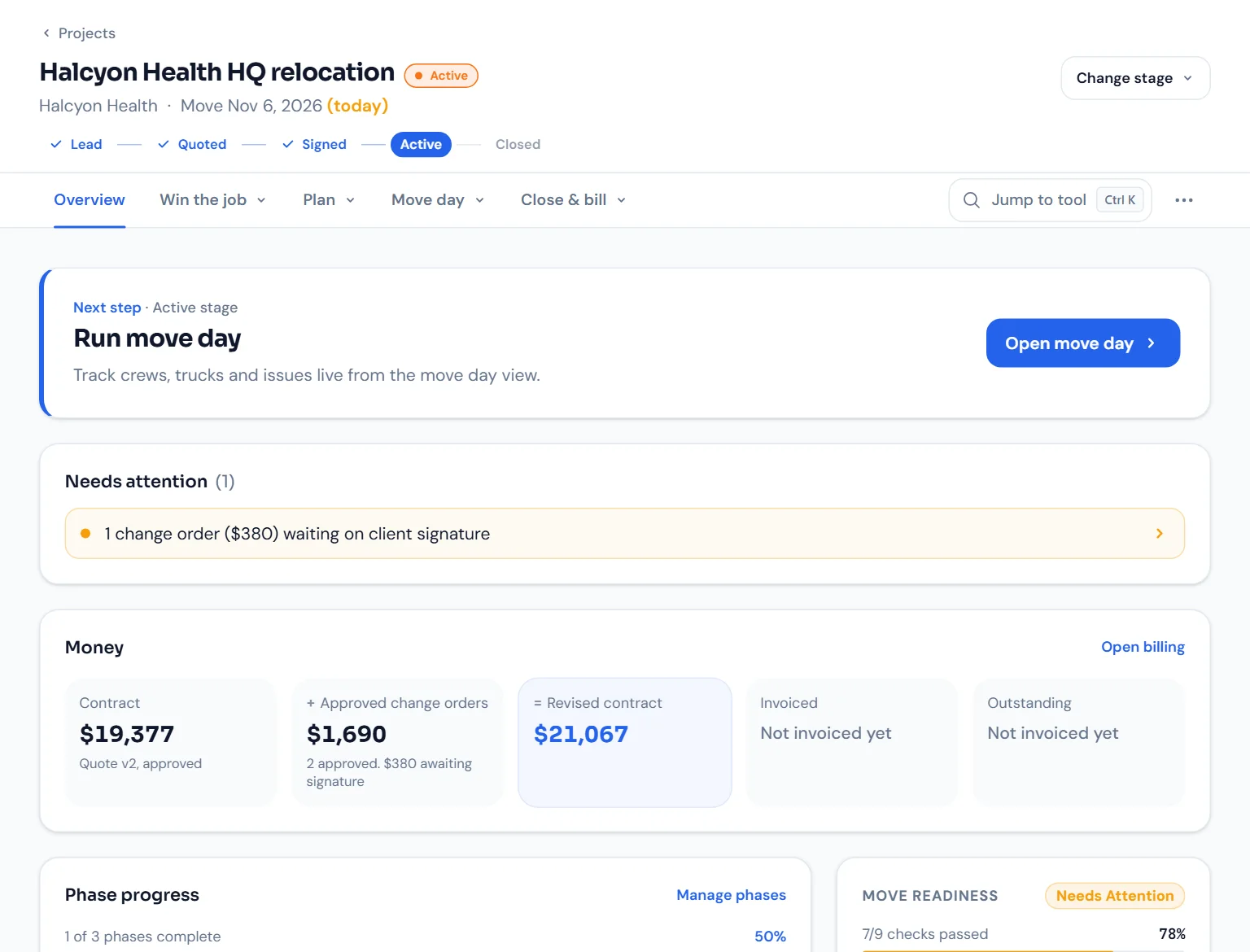
PM and leadership view
One project: what stage it is in, the next step, what needs attention, and the money.
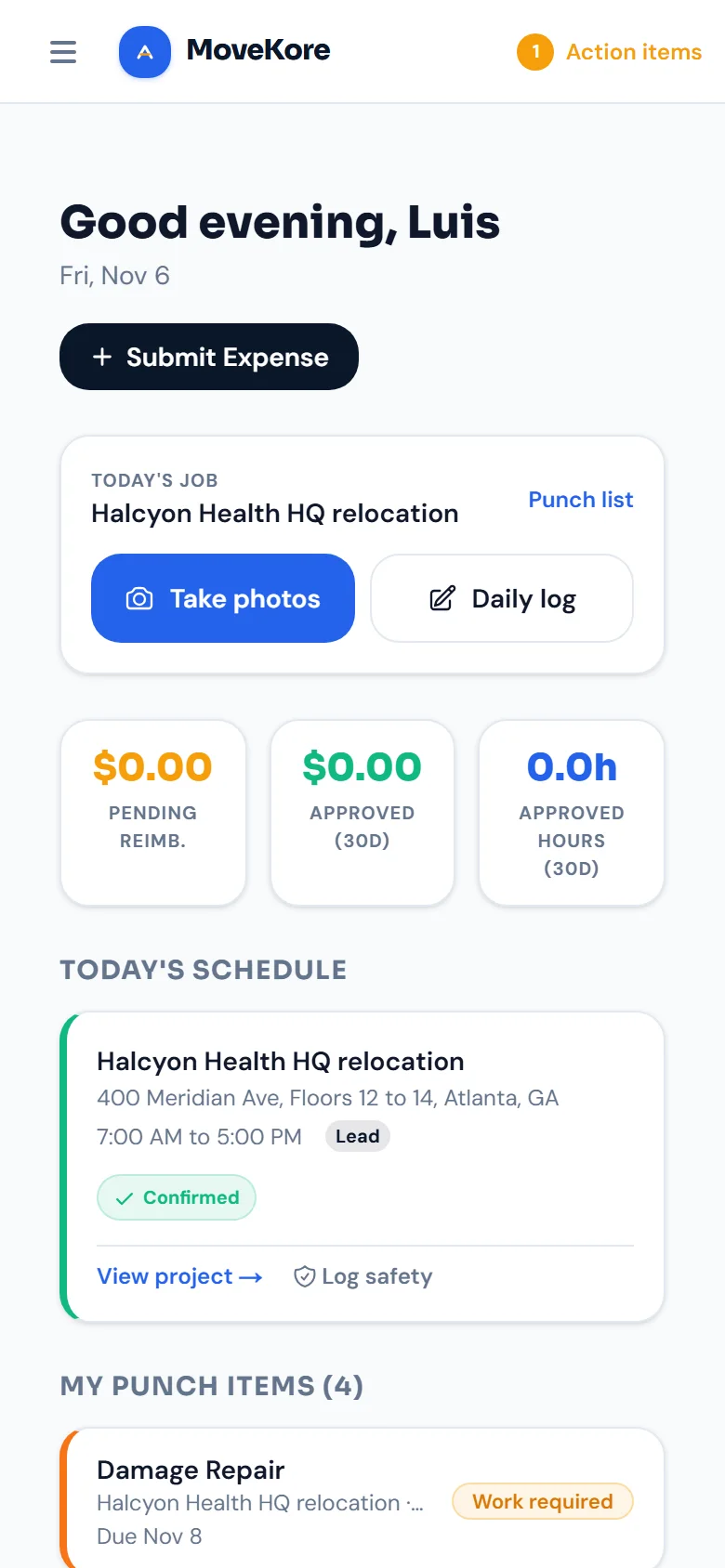
Crew view
In the phone browser: today's job, photos, the daily log, the schedule and their punch items. iOS and Android apps are coming.
Client portal, no login
One private link: what needs a signature, the move date, the running total and project progress.
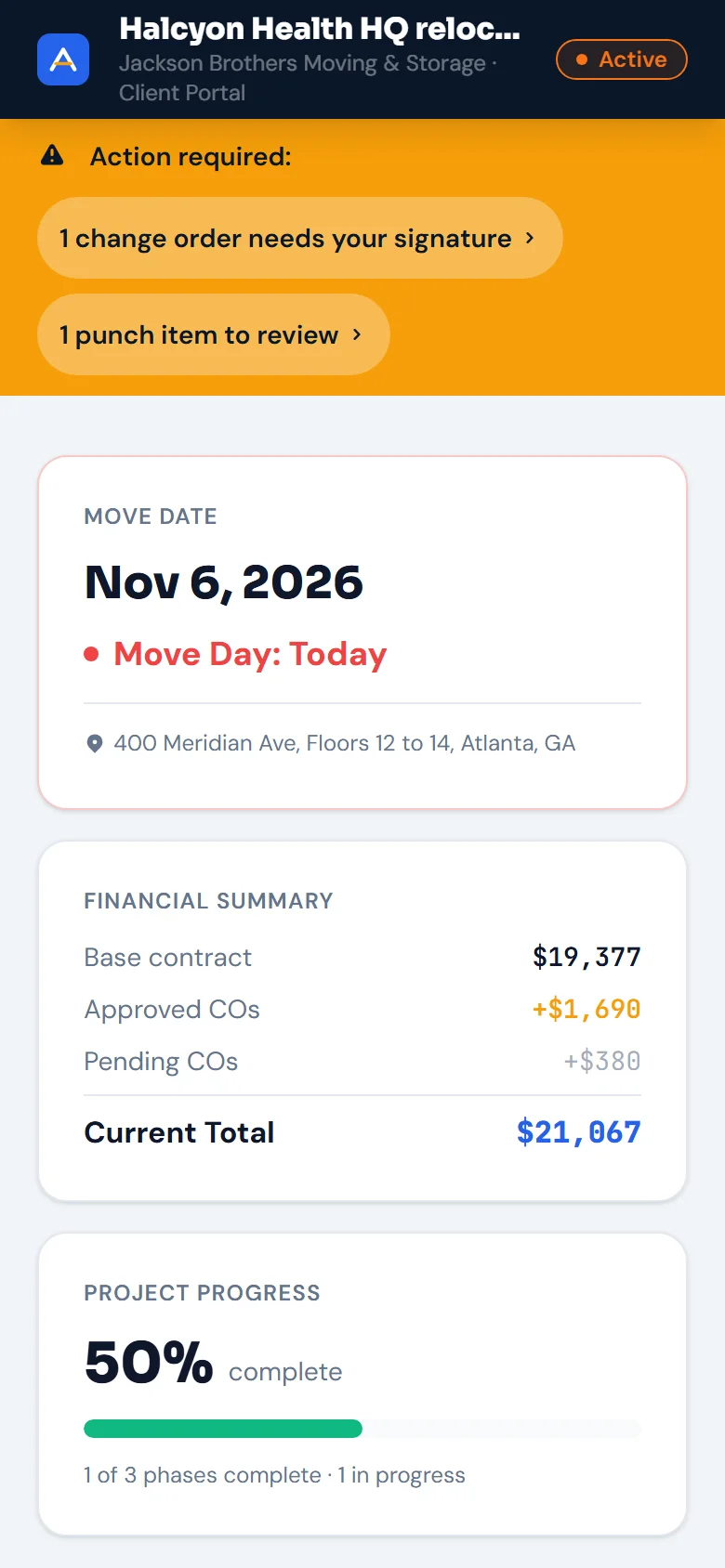
Sample dataReal MoveKore screens. The company and job are sample data. The client portal starts on Professional and the subcontractor portal on Business.
Everything commercial movers need
Every tool here was designed around how a corporate relocation actually runs. Some start on Professional or Business; see pricing for what each plan includes.
Quote Builder
Rate-card presets and line items grouped by labor, trucks and materials. Email the quote and the client accepts it online.
Phase Scheduling
Break complex relocations into phases. Assign crew, set dates, and track start-to-finish progress in real time.
Photo Documentation
Before, after and damage photos filed by room, with the upload time and who uploaded them. A dated record you can point to when a dispute comes up.
Change Orders
Clients sign with a finger on their phone or tablet, on site or from their portal link. Every signed CO is tracked and added to the invoice.
Punch List
Assign items, track who has the ball, and let the client accept or dispute finished work in their portal.
QuickBooks Billing
Push your final invoice (base price plus every approved CO) to QuickBooks Online with one click. Included on Business and up.
Subcontractor Portal
One link, no login. Subs see their phases, upload their COI and photos, and post daily logs.
Client Portal
Give clients a live view of their move. They accept the quote, sign COs, accept or dispute punch items, and open their completion certificate (Business and up).
AI Assistant
AI tools built into the dashboard and project screens. See today's priorities and draft client status reports.
Crew Scheduling
Assign crew to shifts by project and phase. Track availability, confirmations, and coverage gaps before move day.
Timecards
Crew logs hours on mobile. PMs review and approve. All timecard data feeds directly into project cost reports.
Compliance Tracker
Track certificates of insurance, permits and building requirements with due dates. Overdue items surface on the dashboard.
Safety Logs
Records built around OSHA recordkeeping for toolbox talks, near misses, incidents, and equipment inspections. Followups tracked to resolution.
Daily Logs
Timestamped job journals covering crew attendance, work completed, weather, and site issues. Every log attributed and searchable.
Space Inventory
Catalog every item by room, floor, and destination. Flag items needing special handling, disassembly, or condition documentation before the move.
Reports & Analytics
Health scores, phase completion rates, cost variance, and project timelines. Export to CSV or PDF for leadership and client review.
Walk through a real job, step by step
Follow one office relocation from the first site visit to the paid invoice, screen by screen, using sample data. No account needed.
Built for commercial moves.
Not adapted from residential.
MovePro and MoveItPro grew up around residential moving: single-day, single-truck jobs. MoveKore is built for multi-phase corporate relocations, where one missed change order costs real money.
| Capability | MoveKoreplans from $189/mo | MovePro | MoveItPro |
|---|---|---|---|
| Commercial client CRM (corporate accounts, repeat bids) | |||
| Multi-phase project management with crew assignment | |||
| Change order workflow with client e-signature | |||
| COI & compliance deadline tracking | |||
| Client portal: clients open one link, no password | |||
| Before/after photo documentation filed by room | |||
| Safety logs built around OSHA recordkeeping (incidents, near misses, PPE) | |||
| AI tools built into the dashboard and project screens | |||
| QuickBooks Online invoice push (1-click) | |||
| Crew scheduling, timecards, and shift confirmations |
MoveKore column covers all plans. Change orders, the client portal, photos and safety logs start on Professional. QuickBooks Online sync and the subcontractor portal start on Business.
MoveKore starts at $189/mo with no setup fee, and you can sign up for Starter, Professional or Business without talking to sales. Free for 14 days, no credit card required.
Commercial-grade, priced below the top of the market.
Published monthly prices from the moving platforms' own pricing pages, next to MoveKore's most popular plan, which includes photos, change orders, the punch list and the client portal.
Prices as published on each vendor's pricing page, read November 2, 2026. MoveitPro is its 12-month term billed monthly; MoverBase Fleet allows 100 quotes or jobs a month. Plans differ in users and features, and prices change, so check each vendor before deciding.
What changes when the whole job lives in one place
The client portal shows clients where their move stands, so they don't have to call your office to find out.
Every change order is signed in the portal and logged with a timestamp. When a client questions a charge, the signature is right there.
On the Business plan, QuickBooks sync sends the invoice (base plus signed change orders) before the crew is back at the shop.
Simple pricing. No surprises.
Plans from $189/mo. 14-day free trial, no credit card required.

Office moves, start to finish
Made for the people who actually do the move.
Built for commercial movers, from the first site survey to the final signed invoice.
Become the mover who never loses a change order.
Get every change order signed before the crew leaves the building, and keep the quote, the job and the invoice in one place.
14-day free trial · No credit card · Cancel anytime